![RosyLogoSummer-1.png]](https://support.rosysalonsoftware.com/hs-fs/hubfs/RosyLogoSummer-1.png?height=40&name=RosyLogoSummer-1.png)
This article is meant to provide practical recommendations or how to guide clients from a system they know and trust to an improved experience designed to work smarter, look better, and support our users’ needs. You know your clients better than anyone, so it is important to adapt this to how you feel will be best received by your demographic of clients! Some great ways to share this information with clients are through social media and mass email marketing.
Consider sharing pictures or videos of the new platform:
A quick walkthrough tutorial of how to navigate your new booking page or screenshots of the new features and modern appearance of your booking page may encourage clients to check it out! Previewing some of the enhancements should help the change feel more exciting and less intimidating for your clients.
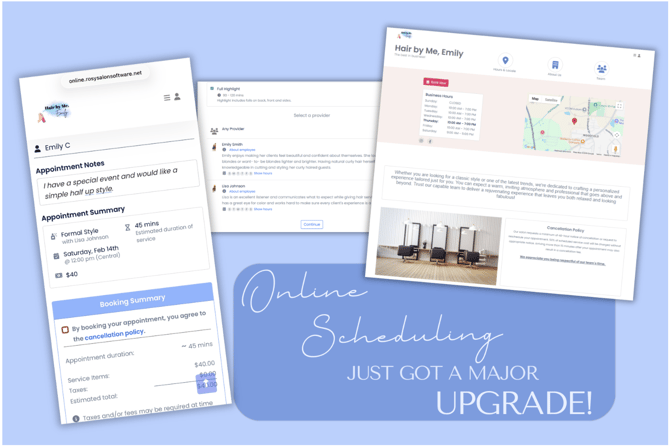
Consider sharing a message like this:
Hi there!
We’re excited to share that we’ve introduced an updated version of our online scheduling system. It has new exciting features such as the ability to see additional service information, add yourself to the waitlist, jump to the next available date, leave appointment notes for your stylist, and so much more!
We know that any change can raise questions, and we want to ensure this transition is as seamless as possible for you. While we begin rolling this out, we will have both the classic system and the new booking system available for you to use. If you are not yet ready to get started on the new platform, you can temporarily still log in and book with the scheduling system you are familiar with. However, we encourage you to try the new one. We think you’ll like it!
FAQ:
- What is your new booking link?
- You can find our new booking page at ____________________
- Why didn't this link didn’t ask me to sign in?
- Isn’t that great? Now, you can see appointment availability before getting signed in! You can always log in using the top menu. Otherwise, you’ll be prompted to sign in before finalizing your appointment or purchase.
- Can I use the same password as your other page?
- You are welcome to reuse your password! However, for security reasons, you will need to go through a password reset the first time you use the new platform. When prompted to login, you can either sign in with Google, Facebook, or click “reset your password” to get signed in.
- What do I do if I get stuck?
- As always, you can contact our team to assist with getting your appointment scheduled if you have any difficulties. You can reach us at XXX-XXX-XXXX or email@email.com